When comparing handheld gaming consoles, one of the most common debates is Steam Deck OLED vs LCD. After spending over six months with both versions side-by-side, the differences go far beyond just the display. Here’s a comprehensive breakdown of what makes the Steam Deck OLED a different beast—and whether it’s worth your money.
My main comparison is against the 256GB LCD model from the original release. This version is still available and now serves as the new entry-level option at $400. It used to cost $529, making it a good value if you’re shopping on a tighter budget. If you want anything above that, you’re stepping into Steam Deck OLED territory.
I’ve been using the Limited Edition 1TB OLED model, which is functionally identical to the regular 1TB model, aside from its unique smoky transparent shell and orange accents.

Steam Deck OLED vs LCD – Design Tweaks
At a glance, both models are nearly identical. Valve retained the same ergonomic frame, although the OLED model is slightly lighter and features a slick translucent shell in its launch edition. Button feedback feels a touch more refined.

While these are subtle, they contribute to the overall improved feel when comparing Steam Deck OLED vs LCD in everyday use.
Battery Life Differences: OLED Advantage
Contrary to expectations, the OLED model lasts longer. How? Valve optimized the hardware, improved thermals, and added a larger 50Whr battery. In real-world testing, this translated into 9+ hours on indie games and even 2 hours on graphically intense titles like Cyberpunk 2077—something that used to cripple earlier-gen consoles.
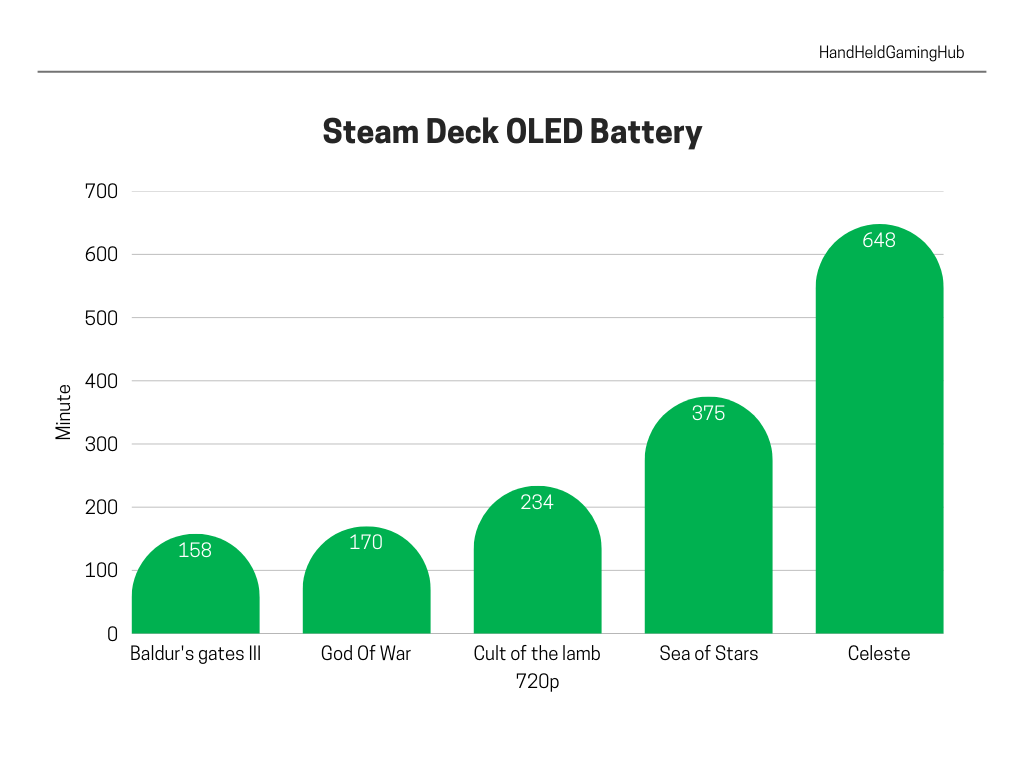
If you’re the kind of player who brings the Deck on long trips or commutes, this upgrade alone could be worth it.
Display Showdown: OLED’s Clear Victory
Here’s where the Steam Deck OLED vs LCD battle truly begins. While both models keep the same 800p resolution, the OLED panel vastly outperforms in every other aspect. Peak brightness now reaches 1,000 nits (up from 400), and HDR support brings vivid contrast and deep blacks. Colors are punchier, glare is less of an issue, and the slightly larger screen (thanks to thinner bezels) makes gameplay more immersive.
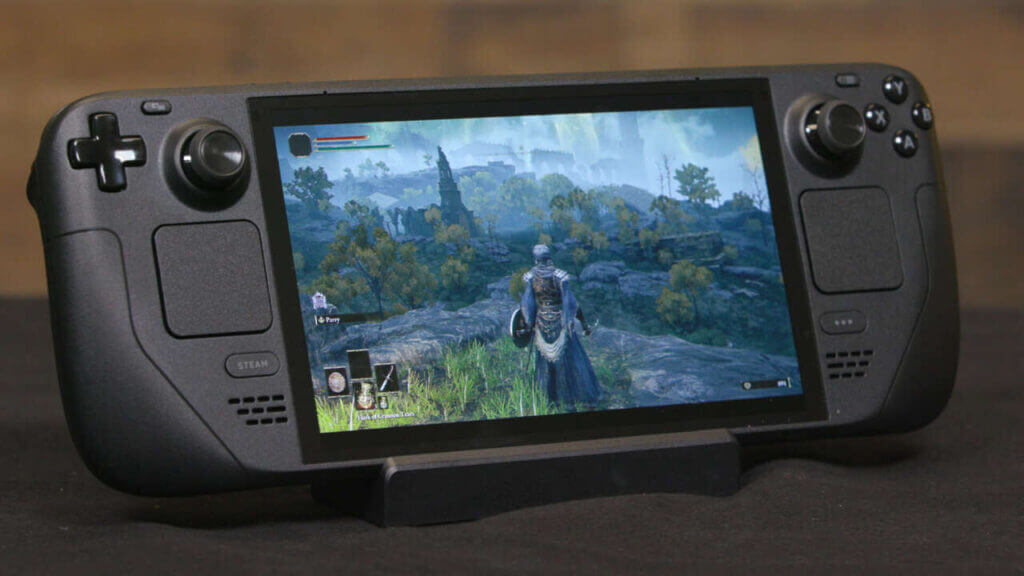
There’s also a slight increase in screen size—from 7″ to 7.4″—which, while small on paper, does feel roomier when held in your hands.
Performance & Refresh Rate
Valve didn’t just stop at the screen. The OLED model includes a more efficient 6nm APU, faster RAM, and a native 90Hz refresh rate—up from the 60Hz on the LCD. While not every game hits that ceiling, lighter indie titles feel noticeably smoother. Even more demanding games feel better at 45 FPS on a 90Hz display than 30 FPS on LCD.
Other Notable Upgrades
- Wi-Fi 6E for faster downloads
- Improved haptics for better tactile feedback
- Faster boot and load times
These might not be deal-breakers, but they certainly round out a more premium user experience on the OLED.
Steam Deck OLED vs LCD – Which One Should You Buy?
Here’s a quick breakdown:
- LCD 256GB : Great for budget-conscious users or docked play.
- OLED 512GB : Best balance of features and price.
- OLED 1TB : More storage, anti-glare glass, and special case.
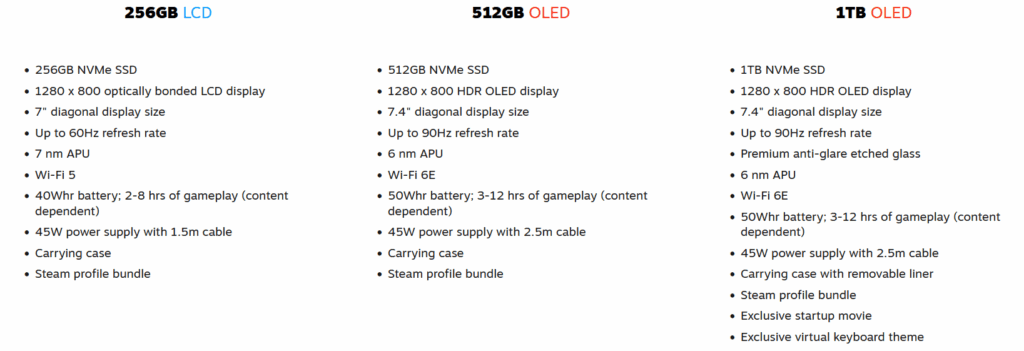
For most people, the Steam Deck OLED 512GB is the sweet spot. You get all the important upgrades without spending too much more.
Already Have a Steam Deck? Should You Upgrade?
If you’re comparing Steam Deck OLED vs LCD as a current LCD owner, think about your use case. If you play often and mostly handheld, the OLED is a real upgrade.
But if you’re a casual user or primarily dock your device, your current Deck is still great.
Not everyone needs the OLED. If you use your Deck docked most of the time, the screen quality is irrelevant. In the Steam Deck OLED vs LCD decision, use case matters more than raw specs.
Final Thoughts: Steam Deck OLED vs LCD

To wrap it up, the Steam Deck OLED vs LCD comparison comes down to how and where you play. If you’re buying your first Steam Deck today, the OLED models offer clear advantages. If you’re upgrading, make sure those advantages match your actual needs.